Verify data sources
Read source recency, history continuity and unknown states correctly.
On this page
What you need
A connected app and permission to inspect its setup. A new connection may have partial history until its sync completes.
Steps
- Open the app in Manage apps and inspect the individual identification, browser and backend-event observations.
- Treat Never observed, receipt within the last seven days and no recent receipt as request observations. They do not certify product installation or merchant activation.
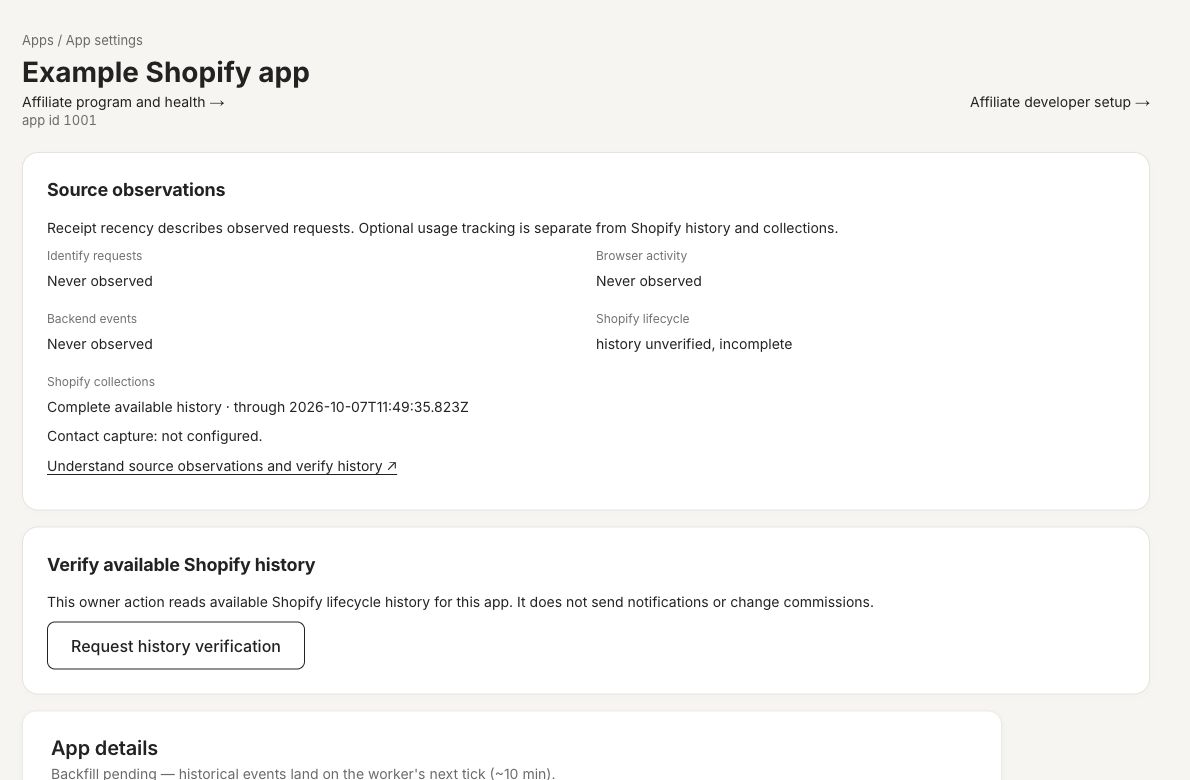
- Use Request history verification when Shopify historical continuity is unverified. Review the resulting source state and timestamps.
- Separately inspect affiliate collection history and production attribution evidence in the program’s Tracking area.
- Repeat the actual event/install test after fixing a source and verify the new receipt belongs to the intended app.
Expected result
You can tell what was received, when it was received and which reporting windows are supported. History replay does not automatically send historical Flow messages.
Source responsibilities
Shopify history supplies lifecycle and financial facts. Identification enriches contact records. Browser activity is analytics-grade. Authenticated app-scoped backend events can describe developer-defined product milestones. Listing export or a signed backend bridge supplies affiliate attribution evidence. Each must be verified independently.
Product example
A fictional local app with independent source observations and history verification. No live merchant data, provider request or money movement is represented.
Troubleshooting
history_unverified means no verified full-history baseline; incomplete means the latest attempt was incomplete; stale means successful completion is over 24 hours old; coverage_gap means baseline continuity does not reach the latest coverage end. An unknown observation is not proof that a merchant failed a step.