Review and report manual payouts
Track external transfers and partner receipt without moving money inside HeyCrust.
On this page
What you need
Financial review permission, an eligible request, agreed recipient/method, currency and enough payable balance. A transfer is performed through your own agreed external provider.
Steps
- Open Payouts and inspect the request, allocated earnings, threshold, recipient, invoice and currency before approval.
- Approve or reject with a reason. Export the payment details/batch if useful and review the export before using an external provider.
- Complete the actual transfer outside HeyCrust.
- Choose Mark payment sent and enter only the actual sent amount, actual payment date/time, external reference and optional HTTPS receipt link. Report a partial transfer as its actual amount.
- Ask the partner to review the payment portion and confirm the received amount or report a problem. Follow the resulting confirmation/dispute records.
- For a mistake or dispute, review evidence and use the available void/resolution/reconciliation action. Administrative reconciliation remains distinguishable from partner confirmation.
Expected result
A payment report awaiting confirmation, then a confirmed, partial or disputed state supported by its evidence. Reporting, approval and export do not themselves transfer money.
Invoice and receipt handling
A request can require an invoice under the agreed policy. The upload must be a valid PDF, use a PDF extension and stay at or below 2 MB; a permitted HTTPS invoice URL is an alternative. Do not provide both attachment and URL for the same request.
Receipt attachments/links provide evidence for review. Partner confirmations cover only the reported portion actually received. Statuses such as awaiting_confirmation, partially_confirmed and admin_reconciled describe different facts. See Partner payment guide.
Product example
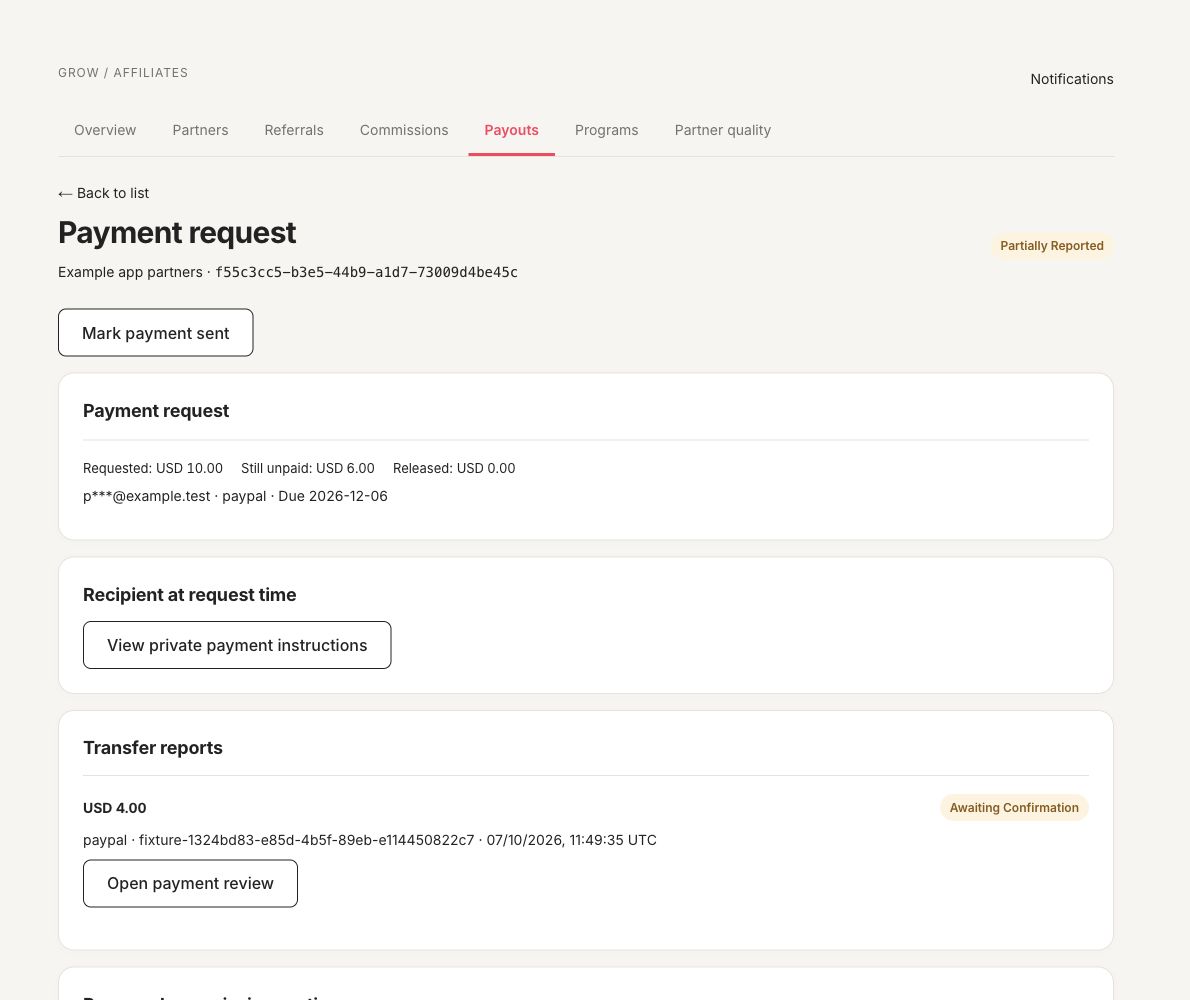
A fictional local payout: USD 4.00 reported, USD 6.00 still unpaid, receipt awaiting confirmation. No live merchant data, provider request or money movement is represented.
Troubleshooting
Check reserved amounts, duplicate references, currency/method mismatch, missing invoice, partial reports and unresolved recovery. A reminder schedule is a review aid, not a payment execution schedule.
Batches, reminders and recovery
Review each approved payout and currency before grouping/exporting a batch. Exported details are an external-payment preparation record. For report imports, preview and review actual external references/amounts before applying; never import invented paid history. Program review timezone/schedule and reminder delays govern owner review and partner confirmation reminders, not automatic transfers. Inspect payout/report history for overdue confirmation, returned or disputed amounts and the recorded recovery/reconciliation decision.